> ## Documentation Index
> Fetch the complete documentation index at: https://docs.solana.vanna.finance/llms.txt
> Use this file to discover all available pages before exploring further.
# Withdraw
> Redeem vTokens for the underlying asset, limited by available pool cash.
## Steps
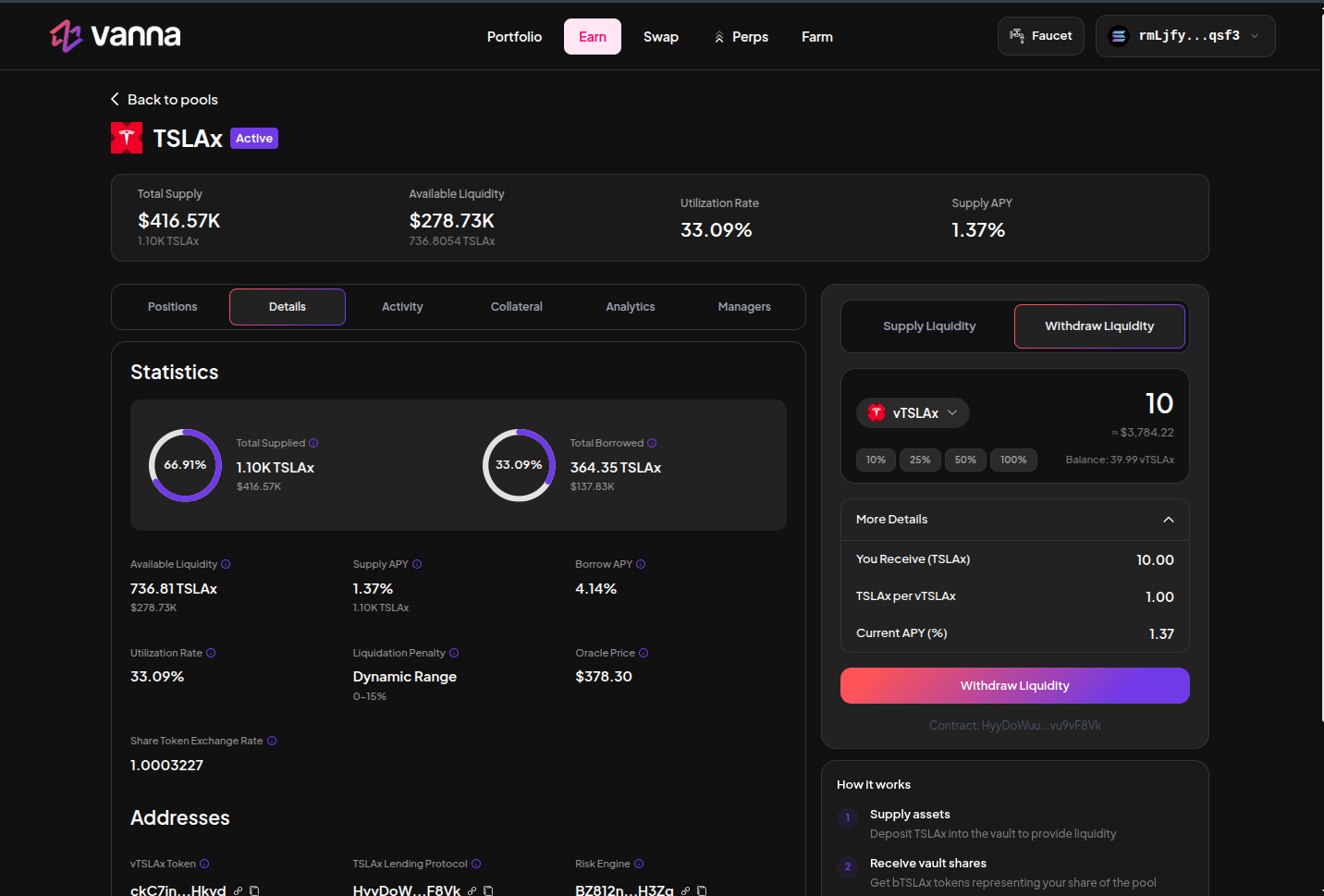
1. Open the pool you supplied.
2. Choose **Withdraw Liquidity**.
3. Enter shares or use a percentage of your position.
4. Review assets out and the current exchange rate.
5. Confirm and wait for the wallet vToken balance to drop.
 ## Limits
You can only redeem against **available cash** in the reserve (accounted liquidity minus protocol fees). If utilization is high, you may need to wait for borrowers to repay or for a liquidation to return cash.
`lender_redeem` burns shares and transfers the underlying out. Assets are rounded down against the lender.
A confirmed redeem that leaves leftover vTokens is normal when you withdraw a portion, or when rounding leaves dust.
## Limits
You can only redeem against **available cash** in the reserve (accounted liquidity minus protocol fees). If utilization is high, you may need to wait for borrowers to repay or for a liquidation to return cash.
`lender_redeem` burns shares and transfers the underlying out. Assets are rounded down against the lender.
A confirmed redeem that leaves leftover vTokens is normal when you withdraw a portion, or when rounding leaves dust.